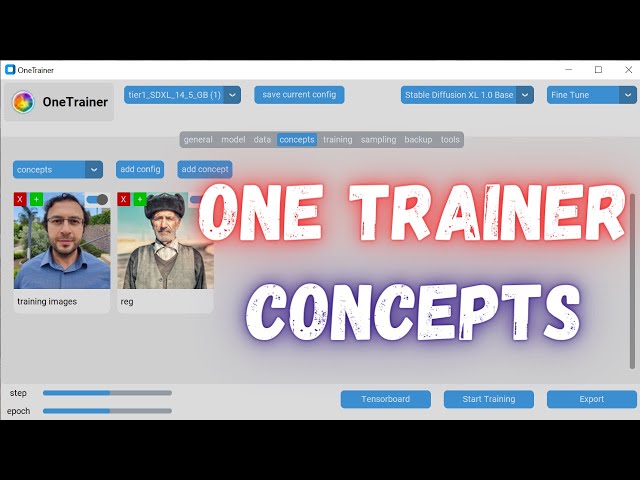
How To Properly Setup OneTrainer Concepts And Some Other Options Quick Tutorial Before Big One
Full tutorial link > https://www.youtube.com/watch?v=yPOadldf6bI











OneTrainer Stable Diffusion XL (SDXL) Fine Tuning Best Presets : https://www.patreon.com/posts/96028218
The Very Best OneTrainer Workflow & Config For SD 1.5 Based Models DreamBooth / Full Fine Tuning :
https://www.patreon.com/posts/97381002
Full Workflow For Newbie Stable Diffusion Trainers For SD 1.5 Models & SDXL Models Training With DreamBooth & LoRA :
https://www.patreon.com/posts/full-workflow-sd-98620163
5200 Ground Truth Regularization Images for Man & Woman (each one has 5200 images) :
https://www.patreon.com/posts/massive-4k-woman-87700469
OneTrainer repo : https://github.com/Nerogar/OneTrainer
-
00:00:03 in this video i going to Show you How to use our very best one trainer
-
00:00:05 use our very best one trainer configurations actually i am working on
-
00:00:08 configurations actually i am working on a full public tutorial Which in which i
-
00:00:11 a full public tutorial Which in which i will Share All of The Hyper parameters
-
00:00:14 will Share All of The Hyper parameters and settings in details and i will
-
00:00:16 and settings in details and i will explain How to use One trainer but it is getting
-
00:00:18 explain How to use One trainer but it is getting delayed therefore Today i going to Show
-
00:00:21 delayed therefore Today i going to Show you How to use these
-
00:00:23 you How to use these configurations We have configurations
-
00:00:25 configurations We have configurations for 1.5 based mod
-
00:00:28 for 1.5 based mod and
-
00:00:30 and mod so it doesn't matter both of working
-
00:00:33 mod so it doesn't matter both of working exactly Same downlo the that vram supports
-
00:00:38 exactly Same downlo the that vram supports for example if you have 12 gab
-
00:00:41 for example if you have 12 gab use the 10.6 gab if you have 16 gab use
-
00:00:45 use the 10.6 gab if you have 16 gab use the Tire 2 if you have 24 gab use this
-
00:00:48 the Tire 2 if you have 24 gab use this One it is Same for sxl As Well so Let's
-
00:00:52 One it is Same for sxl As Well so Let's for example use this 14.5 GB sxl
-
00:01:04 After downloading it go to One trainer installation and paste it
-
00:01:07 to One trainer installation and paste it into Training presets folder so This is
-
00:01:11 into Training presets folder so This is you need to put inside Training presets
-
00:01:15 you need to put inside Training presets Start One trainer
-
00:01:36 him from the settings configuration this was The
-
00:01:39 settings configuration this was The downloaded One so what you need to
-
00:01:42 downloaded One so what you need to change Here is change your workspace
-
00:01:44 change Here is change your workspace directory according to Your hard Drive
-
00:01:46 directory according to Your hard Drive for example Let's it As My F Drive and
-
00:01:51 for example Let's it As My F Drive and Let's Say One
-
00:01:58 trainer so All of theor
-
00:02:12 and Select the folder and Get selected in Here you don't Need To anything el in
-
00:02:15 in Here you don't Need To anything el in the mod Select mods downloading from
-
00:02:19 the mod Select mods downloading from hugging Face repositories you canly give
-
00:02:21 hugging Face repositories you canly give the mod from here
-
00:02:32 cck supported model output Destination Now This is Super important you need to
-
00:02:34 Now This is Super important you need to Give full pad Don't Forget that Give
-
00:02:37 Give full pad Don't Forget that Give full pad with safe T Source
-
00:02:40 full pad with safe T Source extension these are all the best
-
00:02:42 extension these are all the best settings so You don't need to change
-
00:02:44 settings so You don't need to change anything
-
00:02:46 anything there in the
-
00:02:48 there in the data enable latent
-
00:02:51 data enable latent caching it increases the Speed and also
-
00:02:55 caching it increases the Speed and also reduces vram and the most important part is
-
00:02:59 reduces vram and the most important part is concepts in the concepts you need to ADD your Concept
-
00:03:02 concepts in the concepts you need to ADD your Concept One by One for example
-
00:03:05 One by One for example Let's ADD Training images Concept so
-
00:03:08 Let's ADD Training images Concept so After clicking there type As Training images
-
00:03:11 After clicking there type As Training images Give any name you can enable or
-
00:03:14 Give any name you can enable or disable concepts All of The enabled concepts will be Used
-
00:03:16 disable concepts All of The enabled concepts will be Used One trainer doesn't have Dream
-
00:03:18 One trainer doesn't have Dream
-
00:03:24 however We are able to uti regularization images that We have from un
-
00:03:26 regularization images that We have from un that i have collected Select the p of
-
00:03:30 that i have collected Select the p of the images for example My images are
-
00:03:32 the images for example My images are Here will Select them
-
00:03:35 Here will Select them ok Here This is ST 1.5 based config so
-
00:03:40 ok Here This is ST 1.5 based config so Let's Select the
-
00:03:43 Let's Select the folder and in
-
00:03:46 folder and in Here you need to set from text file Per
-
00:03:50 Here you need to set from text file Per sample or from single text file so from text
-
00:03:54 sample or from single text file so from text file Per sample means That it will
-
00:03:58 file Per sample means That it will look for the captions with the same name
-
00:04:01 look for the captions with the same name As the file name And it will read them
-
00:04:04 As the file name And it will read them however i don't use captioning for
-
00:04:05 however i don't use captioning for Training persons so make a caption Here
-
00:04:09 Training persons so make a caption Here like Let's Say caption
-
00:04:12 like Let's Say caption and Let's edit it OK Let's Open
-
00:04:17 and Let's edit it OK Let's Open with it and type ohw Man or woman or
-
00:04:20 with it and type ohw Man or woman or Whatever i will explain All of this in
-
00:04:23 Whatever i will explain All of this in the Other video in details Select so it
-
00:04:27 the Other video in details Select so it will use this caption for All of The
-
00:04:43 humans and i don't know is doing en ring of Sampa i don't
-
00:04:46 of Sampa i don't suggest All of these options are Dis update
-
00:04:50 suggest All of these options are Dis update will see the updated im
-
00:05:07 1. Train ep it will repeat One Times these
-
00:05:10 it will repeat One Times these Training
-
00:05:12 Training images so it will be 15 steps with B
-
00:05:16 images so it will be 15 steps with B size One for my Training images and Now
-
00:05:18 size One for my Training images and Now i going to ADD the regularization images
-
00:05:21 i going to ADD the regularization images so ADD Another Concept and
-
00:05:24 so ADD Another Concept and İnel
-
00:05:49 All L pat
-
00:06:12 and edit it Forget and tye Man because these are all Man images that We are
-
00:06:14 these are all Man images that We are using CL and Select see like selected
-
00:06:21 using CL and Select see like selected and
-
00:06:30 repeat Need div
-
00:06:32 div 500 and put value Here What does this me
-
00:06:38 500 and put value Here What does this me this means that in Every ep it will use
-
00:06:41 this means that in Every ep it will use only 15 images of regularization images
-
00:06:45 only 15 images of regularization images randomly i have tested the effect of
-
00:06:48 randomly i have tested the effect of this it is shared on the patreon As Well
-
00:06:50 this it is shared on the patreon As Well This is improving the Training As
-
00:06:53 This is improving the Training As expected and image augmentation also
-
00:06:56 expected and image augmentation also Close update preview and is working
-
00:07:06 Training Concept
-
00:07:09 Concept Training number of you to train for exle
-
00:07:20 fores 150 working nice and
-
00:07:32 Can extremely important Now they have ADD Save file prefix Which i love it i
-
00:07:35 ADD Save file prefix Which i love it i told The developer To ADD so you can Save
-
00:07:38 told The developer To ADD so you can Save After Every ep and Get checkpoint
-
00:07:41 After Every ep and Get checkpoint and you can Say like My Training One so
-
00:07:46 and you can Say like My Training One so this will be the saved file names
-
00:07:48 this will be the saved file names prefixes they will be saved inside your
-
00:07:51 prefixes they will be saved inside your workspace folder Wherever you
-
00:07:53 workspace folder Wherever you have ok hopefully see you in the full
-
00:07:56 have ok hopefully see you in the full tutorial later