This project aims to help your Visual Studio 2012 Intellisense by providing intelligent
icons for your code members and better function description.
Got it, gimme the gems and skip the boring stuff below :)
Install-Package VS2012-Javascript-Intellisense
In order to define a namespace we simply set on an object __namespace = true
We can also define a namespace with the helper function namespace or shortland ns as below:
namespace("Demo.controllers")
ns("mvvm/knockout", Demo, "/") //place the namespace in an existing namespace and use a custom separator
For example
$.extend(Demo, {
	Class: Class,
	colors: colors,
	IUser: IUser,
	map: map,
	fieldFunction: function () {},
	fieldBoolean: false,
	fieldString: "",
	fieldNumber: 1,
});
When we'll write Demo. the intellisense would look like:
| Before | After | |
|---|---|---|

|

|
|
Although javascript doesn't support classes it does support constructor functions
VS2012 by default only uses two icons to render properties and methods.
function Class() {
		this.onClick = function () { },
		this.thisUndefined = undefined;
		this.thisNumber = 1;
		this.thisString = "";
		this.thisBoolean = true;
		this.thisNull = null;
		this.thisObject = {};
		this.thisFunction = function () { };
		this.thisRegExp = /a/g;
		this.thisDomElement = document.body;
		this.thisClass = Class;
		this.thisClassInstance = new Enumerator();
		this.thisNamespace = Namespace;
		this.thisEnum = Color.Red;
	}
	Class.__class = true;
	Class.prototype.protoMethod = function () { };
	Class.prototype.protoFieldObject = {};
	Class.prototype.protoFieldBool = false;
	var c = new Class();
When we'll write c. the intellisense would look like:
| Before | After | |
|---|---|---|

|

|
|

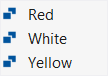
Although javascript doesn't support enums in the .NET sense, it can be very simply achieved
as we can defined as an object
To enable the feature either use the Enum function or manually set __enum = true on your
object.
Color = new Enum({ Red: 1, Yellow: 2, White: 3 });| Before | After | |
|---|---|---|

|
|
|
You can set any of these on your objects/functions accordingly:

__namespace = true- makes an object to look like a namespace
__class = true- makes an function to look like a class
__enum = true- makes an object to look like an enum
__interface = true- makes a function to look like an interface
__map = true- makes an object to look like a dictionary
__const = true- makes an object to look like a constant
__event = true- makes an object to look like an event
__delegate = true- makes a function to look like a delegate
__observable = true- makes a function to look like an observable
__observableArray = true- makes a function to look like an observable array
__computed = true- makes a function to look like a computed observable__glyph = "a valid glyph name"- that member will always be drawn with the provided glyph. See all glyphs- __hidden = true` - that member will always be hidden from intellisense
Note 1:
__glyphand__hiddeenare only working on objects and functions but not on literals numbers and boolean
Note 2:
__computed,__observableand__observableArraycan happen automatically if you do some small changes to knockout.debug.js file See more here
Besides the explicit setting of the above options, following rules apply:
- Anything named
on****will be considered an event - Anything named with an
Uppercaseletter will be considered a Class - Fields will automatically be declared by their current value type i.e.

Number
Boolean
String
RegExp
null
undefined- Anything named
constructoris always considered a Class  Methods defined on
 Object.prototypehave specific glyph icon- Methods defined on
constructor.prototypehave specific glyph icon (like a delegate - unfortunatelly VS2012 icons are too limited!!)  Methods defined on inherited
 .prototypehave specific glyph icon (like an external method) Keyword
 prototypehas a specific glyph icon Any
Any DOM elementwill be automatically detected and have specific glyph icon
By default, in VS2012 the description of .call and .apply methods is missing. This should be the method's description + adding the extra this argument.
Here it is!
method(
method.call(
method.apply(
Please post an issue, fork or edit the code!
We would love to share your experience with us by editing this page
See Wiki Home for more details