



Inspired and Forked from JSON Server
Get a full fake REST API with authorization.
Install HAI Server
npm install -g hai-server
Create a db.json file with some data
{
  "posts": [
    { "id": 1, "title": "hai-server", "author": "sumn2u" }
  ],
  "comments": [
    { "id": 1, "body": "some comment", "postId": 1 }
  ],
  "profile": { "name": "sumn2u" }
}
Start HAI Server
hai-server --watch db.jsonNow if you go to http://localhost:3000/posts/1, you'll get
{ "id": 1, "title": "hai-server", "author": "sumn2u" }Also when doing requests, it's good to know that:
- If you make POST, PUT, PATCH or DELETE requests, changes will be automatically and safely saved to
db.jsonusing lowdb. - Your request body JSON should be object enclosed, just like the GET output. (for example
{"name": "Foobar"}) - Id values are not mutable. Any
idvalue in the body of your PUT or PATCH request will be ignored. Only a value set in a POST request will be respected, but only if not already taken. - A POST, PUT or PATCH request should include a
Content-Type: application/jsonheader to use the JSON in the request body. Otherwise it will result in a 200 OK but without changes being made to the data.
Based on the previous db.json file, here are all the default routes. You can also add other routes using --routes.
GET    /posts
GET    /posts/1
POST   /posts
PUT    /posts/1
PATCH  /posts/1
DELETE /posts/1
GET    /profile
POST   /profile
PUT    /profile
PATCH  /profile
Use . to access deep properties
GET /posts?title=hai-server&author=sumn2u
GET /posts?id=1&id=2
GET /comments?author.name=sumn2u
Use _page and optionally _limit to paginate returned data.
In the Link header you'll get first, prev, next and last links.
GET /posts?_page=7
GET /posts?_page=7&_limit=20
10 items are returned by default
Add _sort and _order (ascending order by default)
GET /posts?_sort=views&_order=asc
GET /posts/1/comments?_sort=votes&_order=asc
For multiple fields, use the following format:
GET /posts?_sort=user,views&_order=desc,asc
Add _start and _end or _limit (an X-Total-Count header is included in the response)
GET /posts?_start=20&_end=30
GET /posts/1/comments?_start=20&_end=30
GET /posts/1/comments?_start=20&_limit=10
Works exactly as Array.slice (i.e. _start is inclusive and _end exclusive)
Add _gte or _lte for getting a range
GET /posts?views_gte=10&views_lte=20
Add _ne to exclude a value
GET /posts?id_ne=1
Add _like to filter (RegExp supported)
GET /posts?title_like=server
Add q
GET /posts?q=internet
To include children resources, add _embed
GET /posts?_embed=comments
GET /posts/1?_embed=comments
To include parent resource, add _expand
GET /comments?_expand=post
GET /comments/1?_expand=post
To get or create nested resources (by default one level, add custom routes for more)
GET  /posts/1/comments
POST /posts/1/comments
GET /db
Returns default index file or serves ./public directory
GET /
You can use HAI Server to serve your HTML, JS and CSS, simply create a ./public directory
or use --static to set a different static files directory.
mkdir public
echo 'hello world' > public/index.html
hai-server db.json
hai-server db.json --static ./some-other-dirYou can start HAI Server on other ports with the --port flag:
$ hai-server --watch db.json --port 3004You can access your fake API from anywhere using CORS and JSONP.
You can load remote schemas.
$ hai-server http://example.com/file.json
$ hai-server http://jsonplaceholder.sumn2u.com/dbUsing JS instead of a JSON file, you can create data programmatically.
// index.js
module.exports = () => {
  const data = { users: [] }
  // Create 1000 users
  for (let i = 0; i < 1000; i++) {
    data.users.push({ id: i, name: `user${i}` })
  }
  return data
}
$ hai-server index.jsTip use modules like Faker, Casual, Chance or JSON Schema Faker.
There are many ways to set up SSL in development. One simple way is to use hotel.
Create a routes.json file. Pay attention to start every route with /.
{
  "/api/*": "/$1",
  "/:resource/:id/show": "/:resource/:id",
  "/posts/:category": "/posts?category=:category",
  "/articles\\?id=:id": "/posts/:id"
}
Start HAI Server with --routes option.
hai-server db.json --routes routes.jsonNow you can access resources using additional routes.
/api/posts # → /posts
/api/posts/1  # → /posts/1
/posts/1/show # → /posts/1
/posts/javascript # → /posts?category=javascript
/articles?id=1 # → /posts/1You can add your middlewares from the CLI using --middlewares option:
// hello.js
module.exports = (req, res, next) => {
  res.header('X-Hello', 'World')
  next()
}
hai-server db.json --middlewares ./hello.js
hai-server db.json --middlewares ./first.js ./second.jshai-server [options] <source>
Options:
--config, -c Path to config file [default: "hai-server.json"]
--port, -p Set port [default: 3000]
--host, -H Set host [default: "localhost"]
--watch, -w Watch file(s) [boolean]
--routes, -r Path to routes file
--middlewares, -m Paths to middleware files [array]
-- auth, -a Authentication file
--static, -s Set static files directory
--read-only, --ro Allow only GET requests [boolean]
--no-cors, --nc Disable Cross-Origin Resource Sharing [boolean]
--no-gzip, --ng Disable GZIP Content-Encoding [boolean]
--snapshots, -S Set snapshots directory [default: "."]
--delay, -d Add delay to responses (ms)
--id, -i Set database id property (e.g. _id) [default: "id"]
--foreignKeySuffix, --fks Set foreign key suffix, (e.g. _id as in post_id)
[default: "Id"]
--quiet, -q Suppress log messages from output [boolean]
--help, -h Show help [boolean]
--version, -v Show version number [boolean]
Examples:
hai-server db.json
hai-server file.js
hai-server http://example.com/db.json
https://github.com/sumn2u/hai-server
You can also set options in a hai-server.json configuration file.
{
  "port": 3000
}If you need to add authentication, validation, or any behavior, you can use the project as a module in combination with other Express middlewares.
$ npm install hai-server --save-dev// server.js
const jsonServer = require('hai-server').haijsServer
const server = jsonServer.create()
const router = jsonServer.router('db.json')
const middlewares = jsonServer.defaults()
server.use(middlewares)
server.use(router)
server.listen(3000, () => {
console.log('HAI Server is running')
})$ node server.jsThe path you provide to the jsonServer.router function is relative to the directory from where you launch your node process. If you run the above code from another directory, it’s better to use an absolute path:
const path = require('path')
const router = jsonServer.router(path.join(__dirname, 'db.json'))
For an in-memory database, simply pass an object to jsonServer.router().
Please note also that jsonServer.router() can be used in existing Express projects.
Let's say you want a route that echoes query parameters and another one that set a timestamp on every resource created.
const jsonServer = require('hai-server').haijsServer
const server = jsonServer.create()
const router = jsonServer.router('db.json')
const middlewares = jsonServer.defaults()

// Set default middlewares (logger, static, cors and no-cache)
server.use(middlewares)

// Add custom routes before HAI Server router
server.get('/echo', (req, res) => {
  res.jsonp(req.query)
})

// To handle POST, PUT and PATCH you need to use a body-parser
// You can use the one used by HAI Server
server.use(jsonServer.bodyParser)
server.use((req, res, next) => {
  if (req.method === 'POST') {
    req.body.createdAt = Date.now()
  }
  // Continue to HAI Server router
  next()
})

// Use default router
server.use(router)
server.listen(3000, () => {
  console.log('HAI Server is running')
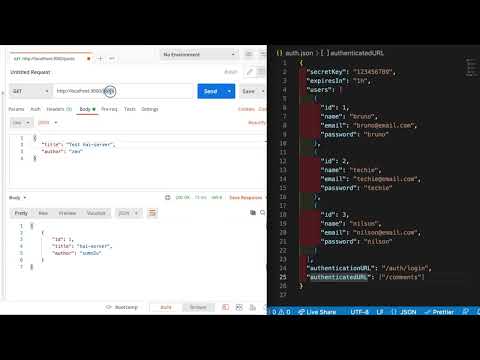
})Create a file name auth.json similar like the one shown below. Provide your own secretKey, expiresIn, and collection of authenticated users. Here the authenticatedURL indicates the collection of URL's that needs authorization and authenticationURL is the URL to get accesstoken.
{
    "secretKey":"123456789",
    "expiresIn": "1h",
    "users": [
        {
          "id": 1,
          "name": "bruno",
          "email": "[email protected]",
          "password": "bruno"
        },
        {
          "id": 2,
          "name": "techie",
          "email": "[email protected]",
          "password": "techie"
        },
        {
          "id": 3,
          "name": "nilson",
          "email": "[email protected]",
          "password": "nilson"
        }
      ],
    "authenticationURL":"/auth/login",
    "authenticatedURL":["/users"]

}
hai-server --watch db.json --auth auth.json --port 3000
You can login by sending a POST request to
POST http://localhost:3000/auth/loginwith the following data
{
  "email": "[email protected]",
  "password":"nilson"
}
You should receive an access token with the following format
{
   "access_token": "<ACCESS_TOKEN>"
}
You should send this authorization with any request to the protected endpoints
Authorization: Bearer <ACCESS_TOKEN>To modify responses, overwrite router.render method:
// In this example, returned resources will be wrapped in a body property
router.render = (req, res) => {
  res.jsonp({
    body: res.locals.data
  })
}
You can set your own status code for the response:
// In this example we simulate a server side error response
router.render = (req, res) => {
  res.status(500).jsonp({
    error: "error message here"
  })
}To add rewrite rules, use jsonServer.rewriter():
// Add this before server.use(router)
server.use(jsonServer.rewriter({
  '/api/*': '/$1',
  '/blog/:resource/:id/show': '/:resource/:id'
}))Alternatively, you can also mount the router on /api.
server.use('/api', router)jsonServer.create()
Returns an Express server.
jsonServer.defaults([options])
Returns middlewares used by HAI Server.
| Option | Description | Default |
|---|---|---|
static |
Path to static files | - |
logger |
Enable logger middleware | true |
bodyParser |
Enable body-parser middleware | true |
noCors |
Disable CORS | false |
readOnly |
Accept only GET requests | false |
jsonServer.router([path|object])
Returns HAI Server router.