Preferences revamp #6294

Replies: 8 comments 37 replies

-
|
This is an exhaustive list of all preferences in the current dialog, and the action I took. Meant to be used as reference. Feel free to skip. General
StreamMove the entire page to a separate dialog. Reason: this is a core feature prominent in the main interface, not a user preference. Audio
Video
OutputRename page to "Encoding"?
HotkeysRename panel to "Keyboard Shortcuts"? Vaguely recall it's a more recognized AdvancedPlease let's just break down and remove this page entirely.
|
Beta Was this translation helpful? Give feedback.

-
|
The first two things I would disagree on are putting "Replay buffer" and delay into general. Both of those are linked to profile rather than global settings, and should probably be in the recording and streaming settings respectively. |
Beta Was this translation helpful? Give feedback.

-
|
As far as I could see in the code, current the Preferences dialog is mostly a profile editor - there's no profile-specific preference that is not present there. Perhaps it's worth moving a lot of these options into a separate "Profile Editor" dialog. I don't have any mockups for that, but it might be worth exploring this idea. |
Beta Was this translation helpful? Give feedback.

-
|
I told you before, but I just need to put on the record that I personally am a big fan of many of these changes. I have a few initial questions though:
Would this be like Discord does it, where pressing exit doesn't close the app but puts in the tray?
It's stated that the goal is to remove the distinction, but I'm wondering why? Where would settings currently in "Advanced" go, like custom ffmpeg, wanky encoders like the mac-vth (no, fixing it is not on the table :p) one etc? The proposal kind of feels like a simple+ mode to me, that doesn't just removes some advanced use cases (which I feel wouldn't necessarily fit into a separate pro-production tool).
Where would the themes go in there? Are color schemes supposed to be themes? If so, they're definitely not. |
Beta Was this translation helpful? Give feedback.
-
Yes, I think so.
The original motivation to this entire revamp was to remove any mentions of "Advanced" in the preferences dialog. I didn't exhautively programmed every single preference in the Encoder (former Output) page, but I think they all would appear progressively, similarly to how it works now. I can try and explore more states of the Encoder page, and include these missing preferences, if that makes you more comfortable 🙂
They're not themes, which is why there's no mention of "Themes" in the screenshot. They'd act more like "flavours", which of course brings some limitations, but on the other hand also brings consistency. I didn't think too much into it. |
Beta Was this translation helpful? Give feedback.

-
Where would themes go in that case? I don't think we should remove them.
Nah, I think it's fine if it should just be the selection that currently is in "Advanced" (I was fearing it would be the one in "Simple")
Not sure how I'd feel about that - compared to Discord, OBS is quite a bit more resource hungry (despite not using Electron :P) and personally I think it's quite hard to tell that an app "hidden" in the system tray is actually running (at least on Windows) - this could lead people to accidentally keep OBS running. |
Beta Was this translation helpful? Give feedback.
-
|
Hiding on close is the expected behaviour of apps that provide a systray icon, isn't it? My understanding is that that option is about making the minimize AND the close button both hide to systray, and I see little value in this preference. |
Beta Was this translation helpful? Give feedback.

-
|
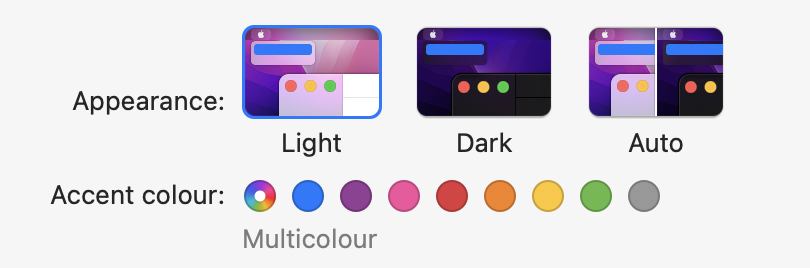
I know it's not really related to this RFC but themes are the bane of my existence when trying to write my version of the Settings dock. Many cases weren't considered when writing the themes because certain widgets are rarely used. Not only that, some of the current themes show some widgets in unintuitive ways (i.e. editable pop-ups should look like line edits with a pop-up button, not like regular pop-ups). I consider it a major accessibility issue that we reinvent the wheel several times when the major difference between each theme is colours — certain themes make button state easier to distinguish, that's about it. That's what colour variations could be used for. And in the end, most users wind up sticking to one of the three built-in themes anyway. Do we have usage numbers for people using their own themes? To me, it would make sense to offer a cross-platform light theme, a cross-platform dark theme, and then the system theme. I think the idea of colour variants is nice, too — especially if we could somehow get the user's system-wide colour variant/accent colour as an option.
But again, I realise that's discussion about a different feature than this RFC covers. :-) |
Beta Was this translation helpful? Give feedback.

-
A service is actually bound to a protocol, this protocol have compatible encoder. Encoder might change if the service change. This separation is not a good idea in my opinion just because of the relation
Multiple services -> possible multiple protocols -> possible multiple encoders. Edit: A profile is bound to a service, separating them is another story. |
Beta Was this translation helpful? Give feedback.
-
|
I wonder if this would be solved by introducing some sort of "Automatic encoder" by default, where OBS would pick the best option based on available encoders, hardware, and the currently active streaming service. |
Beta Was this translation helpful? Give feedback.

-
Hmm, so whenever I have to change the resolutions, it's usually temporarily when I want to make a recording of some individual window, or a cropped recording of the desktop. In this case I have to change both the base and the output resolution at once, and then change them back to where they were also together at once. I can't really think of many situations where I needed to change one individually without the other. Therefore I'm not sure splitting these two into different pages is a good idea. |
Beta Was this translation helpful? Give feedback.
-
|
It has been raised that the unified base, stream, and recording resolutions is not a feature, but rather a limitation. But I hear you... this is probably overcomplicating things, and I don't personally see how this would be useful to many people, so it might be something to offload into the Mythical External Preferences Tool ®. |
Beta Was this translation helpful? Give feedback.

-
|
How about making the default option for stream encoder and recording be to keep the base canvas resolution? |
Beta Was this translation helpful? Give feedback.

-
|
What is the purpose of an "Mythical External Preferences Tool" and why should users prefer it over having a big box of settings pages (read: advanced). |
Beta Was this translation helpful? Give feedback.

-
|
I think there are lots of interesting ideas here about the future of obs, but ill admit my only concern was really about how users of existing features that are relegated to "pro-production" would use obs. We seem to be going off far into the future of obs because of this question. What i would prefer is to consider the actual user experience and journey. Presumably a user wants to change settings, they would click settings, and get into George's proposed new UI. I think we all agree on this. But I would prefer that an intrepid user can explore the toolbar and find an "edit -> pro-production" button which when clicked lets them edit all these other obscure features of obs if they so choose. I think this has a near zero chance of impacting the real user trying to change settings. I think it enables users of obs to continue to relatively easily use existing features of obs. I think it enables users to discover these existing pro-production tools. I think it eases the implementation of settings at a technical level compared to coordinating between two programs. I feel like im being told this is an insane idea and not even worth discussing (without going into the far future design of obs) but I think it's a fairly reasonable point. Moreover considering the proposal is supposed to be incremental and not-all-at-once in nature, but the small point im bringing up is actually quite all-at-once for users, even more so than moving settings a separate part of the same app. |
Beta Was this translation helpful? Give feedback.
-
Blender also does this, im not sure it solves the problem Georges is looking at. Blender (and I assume the adobe tools) still have all their settings in one massive settings dialog that is terrifying for a new/old users to dig through alike. I read this proposal as a move to simplify the settings but if we combined both into different "personas" and shared settings we would be in the same place i think. If we split their settings they would seem like different programs to me more than personas. (or as Georges points out any shared settings would "more complicated than it needs to be for the former, and lacking for the latter.") |
Beta Was this translation helpful? Give feedback.
-
|
@kkartaltepe wI don't think you're being told it's an insane idea. I think the issue is: if the future of OBS looks very different to current, do we want to proceed with a slight tweak and a separate advanced features box, or will the current settings window serve us well enough until greater architectural changes can be made? As you rightly pointed out, the conversation jumped ahead of the initial proposition, but I don't think that's a problem — it shows we're all concerned about the UI/UX of OBS Studio as a whole as well as individual parts. I mentioned in another thread that some of the settings could be inlined into the rest of the interface, which again brings the entirety of the program into this discussion. I don't think they're necessarily separate. I think my idea of Personas "solves" the question of where various settings go whilst also being able to clean up the settings window. The more I think about it, the more Personas would also be split-uppable into separate apps if there were ever such a desire in future. You get the best of both worlds. Advanced workflow for pro users (akin to clicking kkartaltepe's "Edit -> Pro-Production", and tidier Settings window for everybody else. |
Beta Was this translation helpful? Give feedback.

-
|
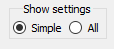
I am personally not sold on forcing existing users who know how to use OBS to migrate to a different flavour of OBS just because the settings they're used to have been removed (most users won't understand or care why). I do agree the current major flaw in the OBS Settings window is that advanced settings are given the same "weight" as non-advanced Settings, resulting in accidentally enabling settings they may not fully understand. Part of that is placement, and part of it is the UI poorly describing what those advanced settings do or why a user should/shouldn't touch them. When I think of providing two flavours of the Settings window, I almost always think of the VLC Preferences window. It's an extreme example (and I'd be against copying it outright), but I feel the idea is solid: in the bottom left corner is a toggle which changes modes between showing the settings 90% of users will want, and showing the rest. This option does not persist, so you enable it, change the 1 setting, and next time you open Settings you're back to Simple mode.
Using the preferences revamp as a base, I would like to see a version with an "Advanced" toggle in the bottom left which exposes additional settings (where they make sense), with new sections in each page, potentially in a different colour or something. |
Beta Was this translation helpful? Give feedback.
-
|
A side thought based on other discussions and screenshots posted above: an app like Krita, Affinity Designer, etc is designed for artists, and can be as simple/complex as the user wants it to be, without downloading two different copies. There's no reason why we couldn't do the same, cater to all potential users in one app (even if that means adaptable UI). |
Beta Was this translation helpful? Give feedback.

-
|
I generally look all the changes you've made, but there may be room to go a step further — move a lot of these settings out of Settings altogether! Something that Xsplit does is make the base resolution and FPS adjustable directly from the main window, which makes a lot of sense to me. Plenty, if not all, of the options relating to multi-view and studio mode could go into the View menu, especially since Docks moved into their own menu. That would put those settings "inline". |
Beta Was this translation helpful? Give feedback.
-
|
I agree that perhaps I may have attached myself too much to the status quo of that dialog - inlining some of these preferences in the places where they are controlled sounds like a better approach to me. It's somewhat what I handwavely had in mind with global audio devices, but that was a late thought. I have some more studies on profiles, outputs, and encoders that need some maturing before I publish them, but seems to make quite a few of these settings just fall into a well fitting place. |
Beta Was this translation helpful? Give feedback.
-
|
List of possible inline settings:
|
Beta Was this translation helpful? Give feedback.
-
|
In my opinion, a user shouldn't be changing resolution and FPS often enough for them to take up valuable space in the main window. |
Beta Was this translation helpful? Give feedback.

-
|
To start, I 100% agree with the following:
Thank you very much for getting the ball rolling on this and starting a public discussion on this topic. The Settings window is something many of us would like to completely overhaul, so this is great to see. I'm also liking fewer settings per page in favour of more pages with better categories (and therefore less scrolling). More specific feedback for the rest of it: I'm happy with the General page, though it feels very empty compared to as it is now. I agree with all the decisions related to the Appearance tab. A future ability of high contrast themes sounds awesome. For the Scenes & Sources page, I agree with pretty much everything. I would personally name it something like "Canvas & Scene Editor" as none of the settings are particularly related to scenes & sources themselves (I additionally have plans for a separate "Sources" page with a variety of new options). I also hope someday soon we'll be able to move Multiview into its own settings page (or its own Tools window or Dock) to provide significantly more control. I think Safe Areas is perfectly OK in here. The Keyboard Shortcuts screen oversimplifies them a little too much. However, I agree that having the Shortcut Activation setting in here makes a lot of sense. The Audio tab continues to be a tricky one. The settings included in your screenshot would be what I consider the "bare minimum", and agree a visual preview would be beneficial. Video tab looks good to me. I do worry about how much complexity the HDR changes will potentially add to this screen, and that moving the existing options for Canvas size vs Output resolution will confuse existing users. It's worth noting that in the current Settings window, changing the scaling resolution in this location results in downscaling ocurring on the GPU, whereas downscaling in the Output tab is done on the CPU. Of all the screens, I expect the Encoding screen to be the focus of most discussions, both in terms of trying to cut down on the existing complexity, future plans, and trying to provide the correct level of configuration for all kinds of users. At the end of the day, there are valid reasons for the current Simple / Advanced toggle, and a whole lot of unnecessary complexity and poor UX/communication that many of us would love to get rid of. At the very least, I think the current design of the Encoding tab is too oversimplified. It removes capabilities like the Twitch VoD track, and provides no way for the user to choose how files are written (especially filename formatting, which we currently have under Advanced). I do agree that most of the streaming configuration (and especially connecting accounts) should be done in a separate dialog/flow and that it's probably confusing to have it in the Settings dialog. Finally, while you didn't include a screenshot of the Network tab, that one also looks good in terms of complexity. Overall I don't expect that one to change much (though it is missing some of the Windows-only settings of Enable network optimizations & Enable TCP pacing). Again, thank you for doing this. I hope to see a lot of discussion about how existing settings should be structured, and hopefully we can come up with a set of rules for future settings so that we don't eventually have to do this all again. |
Beta Was this translation helpful? Give feedback.
-
|
Thanks for the detailed feedback, @WizardCM. I'll certainly incorporate some of your comments on the next round of mockups, which I hope to publish soon. |
Beta Was this translation helpful? Give feedback.
-
I'm not so sure about this one. There are times where you want to temporarily disable something, not change a value. @GeorgesStavracas: in your example about enabling delay and amount of delay, presumably "disabling" that setting would be to set the delay to zero — but if one only wants to temporarily turn delay off? They have to remember what the setting was prior to setting it to zero. Having a button to "reset to default" isn't helpful here; what if the setting they used wasn't the default? That one really has to be on a case-by-case basis, not taken as a maxim. At the very least, I think the current design of the Encoding tab is too oversimplified. It removes capabilities like the Twitch VoD track, and provides no way for the user to choose how files are written (especially filename formatting, which we currently have under Advanced). Just for that specific example, could not the Twitch VoD track selection be part of the Streaming settings dialogue if one is setting up Twitch? One thing I noticed OBS tries to do is be as generic as possible — and I think that's partly why the Settings dialogue has everything including the kitchen sink. But to have per-service settings like this exposed in a particular dialog only when that service is in use would be great — does this link to PR45 or PR39 in any way? |
Beta Was this translation helpful? Give feedback.
-
|
Yes, I'm working on new mockups that don't even have the Encoder page - all encoding options are separated into a separate dialog to control multiple outputs |
Beta Was this translation helpful? Give feedback.


Uh oh!
There was an error while loading. Please reload this page.
Uh oh!
There was an error while loading. Please reload this page.
-
Greetings OBS community!
Apologies beforehand for the massive wall of text - and screenshots! - that will follow. Perhaps I should have shared this earlier, before it reached this massive size.
Anyway.
I've been doing a review of the current preferences that OBS Studio exposes in the preferences dialog, and trying to reorganize them in a way to make them more accessible, clearer, and generally friendlier. You can find the results of this review below. I would like to hear your comments and suggestions, especially on the open questions that I'll also be listing below (marked with
TODO:s).Disclaimers
Please keep in mind the following:
It's very likely that some of the proposed changes here might require their own separate discussions. We can split them off as needed.
Proposed Changes
While prototying these changes, I tried to stick to the following rules:
Let's go through these proposals page by page.
General
The system tray preference is only present when the host system supports it.
The General page here incorporates the replay buffer, and the delay preferences. Replay buffer and delay are only enabled when users set a value higher than zero. Ideally the replay buffer would be paired with an "immediate replay" feature within OBS Studio - this doesn't yet exist as far as I'm aware, except through scripts.
Appearance
This iteration of the Appearance page includes support for the dark style preference that many platforms provide nowadays.
Color schemes recolors OBS Studio windows and elements by setting the accent color, suggested and destructive action colors, and a few others. They wouldn't completely change the the UI, for example by changing paddings, margins, or outlines; instead, they're more like "flavours" of OBS Studio. Each color scheme shipped by default should be compatible with both dark and light styles, and support accessibility options such as high contrast, large fonts, among others.
Scenes & Sources
This page incorporates all preferences related to editing and visualizing scenes and sources. Many of these preferences came from the current dialog's General page.
TODO: Multiview needs a proper description
TODO: Re-evaluate if "Safe Areas" should be moved into the external preferences tool
Keyboard Shortcuts
(The list of shortcuts in the screenshot is not exhaustive. They're just placeholders.)
The Keyboard Shortcuts page now incorporates the "Shortcut Activation" preference. The search field searches simultaneously for the shortcut name, and the triggers.
Other than that, this page should behave a lot like the current Hotkeys page.
Audio
The Audio page now also contains the "Tracks" section from the current dialog's Output page.
TODO: Re-evaluate if "Audio Meter" should be in the external preferences tool. I couldn't craft a motion prototype of the preview, but I think it would be a good addition to show a preview of these audio meter options.
Video
Mostly contains the current options, plus the color profile section from current dialog's Advanced page.
TODO: Proper description to the Color Profile section
Encoding
By far the densest page. The goal here was to remove the Simple / Advanced selector, and try and present the current options as descriptively as possible.
Both Streaming and Recording are shown in the same page, and recording still defaults to the same encoding parameters from Streaming. If a different encoding method is selected for recording, the exact same preferences of Streaming show in the Recording section.
Removed Pages
Pages that are in the current dialog, but not in the proposal above.
Streaming
Because streaming is a central use case to OBS Studio, the approach I've taken to it was to split it into another dialog:
This dialog assumes one could set up multiple streaming services, and pick one. Each profile would store the last used streaming service.
Advanced
Most of the preferences in the advanced
Epilogue
This is a pretty massive discussion thread. Please chew on it, and share your comments.
I'm cautiously positive that splitting off some of these preferences into another tool, focused on pro-production, will make more people happy than bothered - regular users won't be crushed by lots of options of little relevance to them, and industry professionals would be able to have a targeted tool to them.
I'm hopeful we can make OBS Studio a little bit better by improving how it handles its preferences.
Beta Was this translation helpful? Give feedback.
All reactions